When voice routing feels random in a Salesforce org, it’s usually not a “CTI feature” problem. It’s because three basics are not wired cleanly into Salesforce:
- Who should take the call (skills and queues)
- When the team is actually open (business hours)
- Whether the number should be contacted at all (consent / A2P context)
If these live partly in a CTI portal, partly in carrier consoles, and only partly in Salesforce, the result is fragile operations and constant exceptions.
As a result, admins end up debugging two different routing engines for every escalation.
A stable model puts all three under Salesforce control and treats CTI as an execution layer, not a second system.
1. The non-native pattern: routing “next to” Salesforce
In a typical non-native Salesforce CTI setup:
- Skills and queues are configured in a CTI admin UI
- Opening hours and holidays are maintained again in the CTI platform
- A2P registration and number policies stay in the carrier portal
Salesforce then receives:
- Call activities synced back after the fact
- Limited context on which rules were applied
- Little visibility into which numbers and campaigns are safe to use
Practically, that leads to issues architects know well:
- Adding a new team or queue means changing configs in multiple places
- Hours change on the website but not in CTI, or the other way around
- Outbound calls and SMS campaigns share numbers, but consent and registration are unclear
The core problem is simple: Salesforce is not the system of record for routing, time, or permission. It is just one more consumer of CTI data.
2. A Salesforce-first model: CTI as an extension
A native Salesforce CTI model reverses this:
- Salesforce owns skills, queues, and capacity (Omni-Channel)
- Salesforce owns business hours and holidays
- Salesforce owns consent and A2P-relevant information
- CTI uses those decisions to place and receive calls and logs everything as standard records, for example Voice Call
In this model:
- When teams change, you update Salesforce queues and skills once
- When hours change, every channel that respects Salesforce business hours behaves consistently
- When reviewing outbound, you can see from Salesforce which numbers and contacts are safe to use
This is less about “native vs non-native” branding and more about who actually controls the contact center logic.
3. Skill-based routing: keep skills with agents, not in a CTI silo
Skill-based routing is easier to manage when skills live on users and queues inside Salesforce.
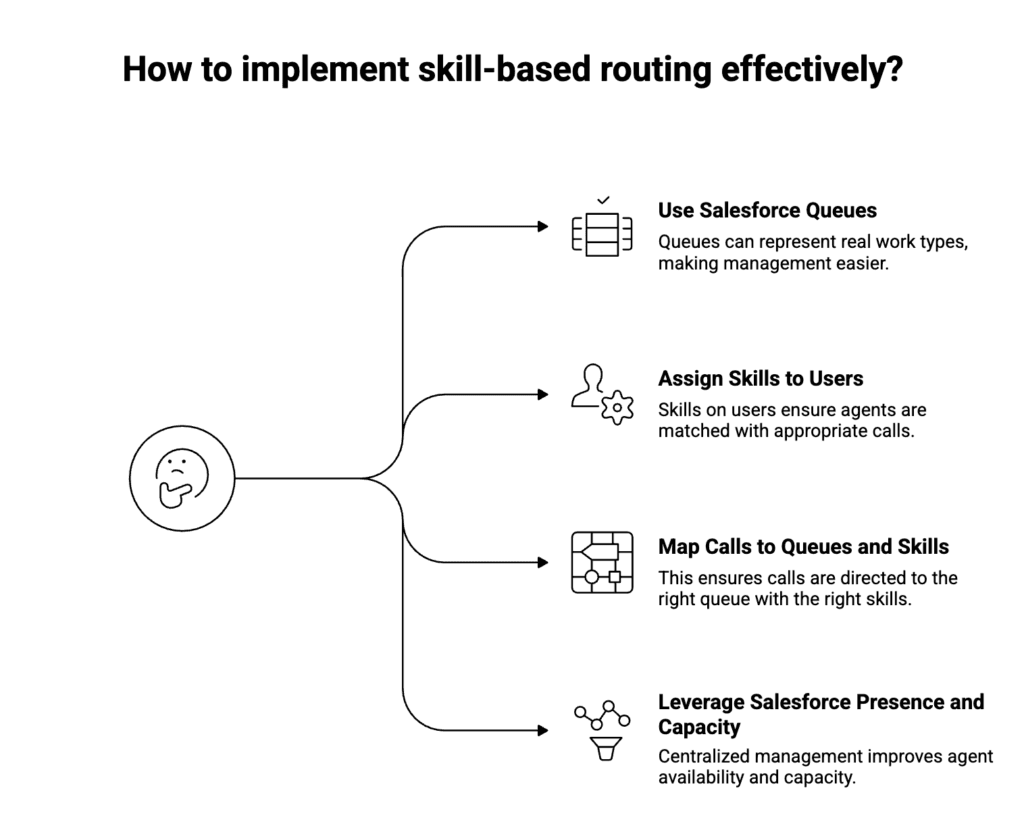
A practical pattern:
- Queues for real work types
Support – Tier 1,Support – Tier 2,Sales – Inbound,Sales – Outboundas Omni queues.
- Skills on users
- Language, product area, region, seniority configured as Omni skills on the agent, not on the CTI platform.
- Mapping calls to queues + skills
- Numbers, IVR options, or call reasons resolve to:
- A target queue
- A required skill set (for example, Billing + English)
- Numbers, IVR options, or call reasons resolve to:
- Presence and capacity from Salesforce
- Agents use Salesforce presence; capacity is managed centrally in Omni.
A native CTI simply asks Salesforce:
“For this Voice Call, which queue and which available, skilled agent should receive it now?”
There is no separate routing brain to keep aligned.
4. Business hours: one source of time truth
Business hours logic should not be re-implemented in CTI.
In a Salesforce-centric setup:
- Business hours and holidays are defined once in Salesforce
- Omni-Channel uses them to decide whether to route live, send to voicemail, or trigger after-hours flows
- Flows and automations reference the same configuration
This avoids:
- Calls reaching agents outside their expected schedule
- Different behavior between cases created by email and cases created by calls
- Extra work every time hours or regions change
The rule is straightforward: there is one calendar, and CTI respects it instead of redefining it.
5. A2P and consent: calls and messages share the same guardrail
A2P registration is often treated as a “messaging problem”, but it affects voice whenever:
- The same numbers are used for calls and SMS/WhatsApp
- Carriers evaluate traffic across channels
- Outbound campaigns mix voice and messaging
A Salesforce-first approach:
- Store number ownership and usage in Salesforce:
- Which business unit uses which numbers
- Which countries and use cases are allowed
- Maintain consent and preferences on Leads/Contacts/Accounts
- Run outbound voice and messaging through a shared guardrail Flow:
- Check consent
- Check whether the selected number and purpose align with registration and policy
- Only then allow CTI or messaging to proceed
CTI should expose enough data back to Salesforce so admins can see:
- Which numbers drive which calls
- Where complaints or risk are concentrated
- How outbound volume relates to what was registered
That keeps compliance in the same governance space as the rest of your CRM.
6. Putting it together: one pattern for inbound and outbound
Once routing, hours, and consent live in Salesforce, the flows become predictable:
- Inbound:
- Telephony hands the call to native CTI
- A Voice Call is created at start
- Salesforce chooses queue and agent based on IVR input, skills, and business hours
- If no one is available or you are closed, a Salesforce Flow drives voicemail or callback behavior
- Outbound:
- Lists and campaigns are built in Salesforce
- A guardrail Flow checks consent and number policy
- If voice is allowed, CTI places the call and logs it as a Voice Call
- If not, only allowed channels are used
For admins and architects, you now have one place to understand and change how the contact center behaves.
7. Where DialForce fits
If you want this model in practice; Salesforce owning skills, queues, hours, and guardrails, with CTI following those rules the implementation matters.
DialForce is built around that pattern:
- 100% native Salesforce CTI on Lightning
- Softphone as a Lightning component using Open CTI and Salesforce Voice APIs, not an iframe or plugin
- Twilio as the telephony and WhatsApp layer, while routing runs through Omni-Channel
- Calls logged as Voice Call records with recording references and access controlled by standard Salesforce tools
That way, skill-based routing, business hours, and A2P-aware outbound can all be owned by your Salesforce team, not by a separate CTI admin console.
Taken together, these patterns give you a Salesforce-first model for skill-based routing and business hours.
If you want to sanity-check how closely your current CTI setup matches this Salesforce-first pattern, the DialForce team can walk you through a reference model and highlight gaps.
Author: Nikhil – Senior Client Consultant
I spearhead marketing and Salesforce telephony integration initiatives for DialForce, a cutting-edge solution connecting Twilio with Salesforce. I craft high-impact blogs, guide users through onboarding and training, and drive adoption of advanced call management and automation across industries. Passionate about enhancing customer engagement through technology, I support businesses in improving their communication processes.