Most “AI for calls” projects don’t fail because the models are bad. They stall because the call information land outside the Salesforce workflow, so nobody trusts them, and nothing downstream changes.
What seems to hold up in real orgs is simpler: treat AI outputs as inputs to the next Salesforce step, not as a separate layer of text agents skim once.
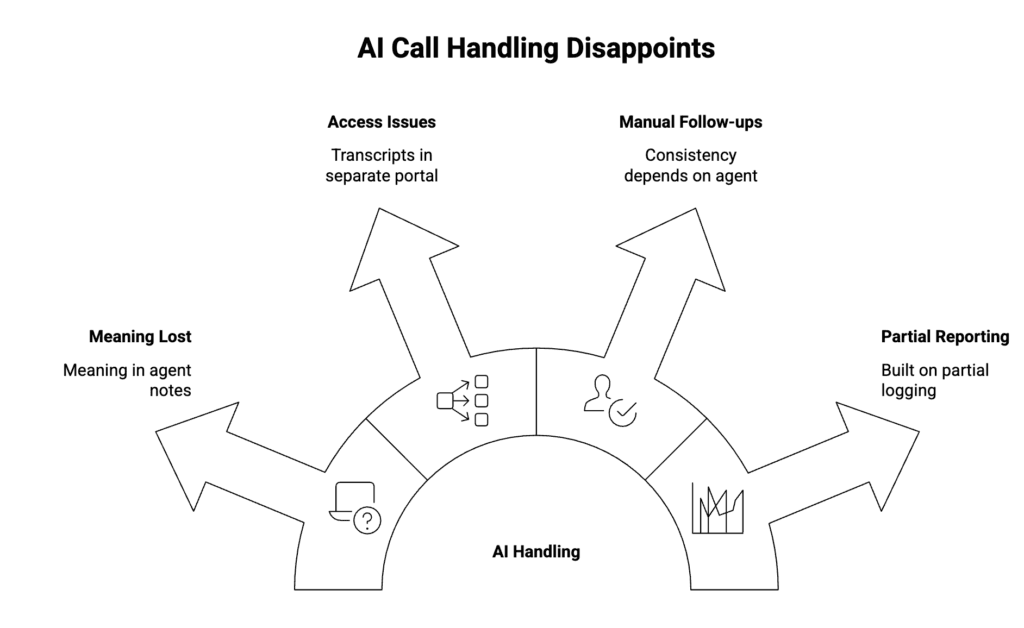
Where AI call handling usually disappoints
A few patterns show up repeatedly:
- The call gets logged, but the “meaning” of the call stays in someone’s notes.
- Transcripts and recordings sit in a separate portal, so access and audits become a second system.
- Follow-ups are still manual, so consistency depends on the agent.
- Reporting looks complete, however it’s built on partial logging and late updates.
As a result, AI feels like extra output rather than operational improvement.
A useful way to think about it
“Smarter call handling” is basically three questions:
- Does the call create a reliable Salesforce record right away?
- Do summaries/transcripts attach to the same record with the right access rules?
- Do those artifacts trigger consistent follow-ups without copy/paste?
If the answer is “no” to any of these, AI usually becomes optional reading.
The CTI + AI pattern that tends to work
1) Capture the call in Salesforce with minimal friction
Nobody gets excited about call logging, but it’s the foundation.
At minimum, teams need:
- Click-to-dial and inbound screen pops tied to real Salesforce records
- Call outcomes recorded consistently (direction, duration, disposition)
- Recordings linked to the call record (when recording is enabled)
Otherwise, you’re summarizing something that can’t be reliably reported later.
2) Store call information where the workflow lives
The outputs that actually get used are usually:
- A short summary that can be scanned in 10 seconds
- Key points (what was agreed, dates, next action)
- A transcript for search/QA/disputes
- Sentiment as a hint (useful sometimes, not a source of truth)
The important part isn’t the list. It’s that these artifacts stay attached to the call record and related Contact/Case/Opportunity, so they can be governed like the rest of Salesforce data.
3) Let automation do the boring follow-up
This is where the ROI usually shows up, because it reduces variability.
Examples that are easy to operationalize:
- If the call includes “reschedule,” create a follow-up task with a due date.
- If it’s a support issue, create/update the Case and prefill a clean summary.
- If it’s a pipeline call, create the next activity and add notes to the Opportunity.
In other words, the summary is useful, but the automatic next step is what changes behavior.
4) Keep ownership with admins
If routing rules, business hours, and reporting require a separate console, the system drifts. Meanwhile, admins lose speed.
What holds up better is:
- Routing and work assignment that aligns with how your org already runs
- Supervisor controls governed in the same environment agents work in
- Reporting based on Salesforce records rather than reconciliation across tools
This is less about “features” and more about operational ownership.
Why native architecture matters more once AI is added
AI amplifies your baseline architecture.
- If calls are logged late, AI outputs are late too.
- If recordings/transcripts live outside Salesforce, governance lives outside Salesforce.
- If the call record is Salesforce-owned, automation and reporting stay consistent.
So the decision is usually: “Are we making Salesforce the system of record for call handling, or just a place to display it?”
Implementation note
If you’re aiming for native CTI inside Salesforce Lightning with call logging, recordings, and AI artifacts stored on Salesforce records, plus admin-owned routing/analytics, DialForce is one way to implement that approach (Voice APIs/Open CTI patterns with Twilio as the telephony backbone).
For teams evaluating Salesforce-native CTI approaches that support call logging and AI-driven follow-ups on Salesforce records, DialForce is listed on AppExchange. AppExchange Link
👉🏻 Map call logging, AI artifacts, and follow-up automation to a Salesforce-owned model
Author: Nikhil – Senior Client Consultant
I spearhead marketing and Salesforce telephony integration initiatives for DialForce, a cutting-edge solution connecting Twilio with Salesforce. I craft high-impact blogs, guide users through onboarding and training, and drive adoption of advanced call management and automation across industries. Passionate about enhancing customer engagement through technology, I support businesses in improving their communication processes.