Most Salesforce teams I meet already “use WhatsApp.”
Sales reps call from their mobile. Support teams answer customer voice notes. Managers see screenshots in Slack, not data in Salesforce.
The moment you ask, “Can we treat WhatsApp voice calls like any other call in Salesforce?” the gaps show up very quickly.
What people usually mean by “WhatsApp Voice in Salesforce”
In practice, I see three common patterns:
- Purely informal use
- Agents call from personal WhatsApp on their phone.
- At best, they manually log “Called via WhatsApp” as a Task.
- There is no recording, no routing, and no way to audit what was said.
- Overlay tools and browser plugins
- A browser extension opens WhatsApp Web next to Salesforce.
- The tool creates Tasks or notes after the call ends.
- Reporting lives in the tool’s dashboard, not on Salesforce objects.
- Telephony CTI + separate WhatsApp
- Voice calls use CTI; WhatsApp calls sit on another platform.
- The two channels never share a common “call” record.
- Managers can’t answer a basic question: “How many customer calls came through WhatsApp vs phone last week?”
All three patterns have the same problem:
Salesforce is not the control plane for WhatsApp Voice. It only hears about calls after the fact, if at all.
A Salesforce first view of WhatsApp Voice
Before you talk about any app or provider, it helps to define what “good” looks like.
In a Salesforce-first design:
- Every call, whether PSTN (Public Switched Telephone Network) or WhatsApp, is a Voice Call record.
- The channel (Phone vs WhatsApp) is just a field, not a different system.
- Routing is driven by Omni-Channel queues, skills, and presence.
- Flow and Apex enforce business rules before a call is connected.
- Analytics and audit live entirely on Salesforce objects.
WhatsApp and the carrier become the media layer.
Salesforce becomes the brain.
Once you look at it this way, “WhatsApp Voice in Salesforce” stops being a feature request and becomes a straightforward architecture question:
How do we represent WhatsApp calls as first-class Voice Call records and treat them like any other native CTI call?
The core data model: one call object, multiple channels
The starting point is the call model. A clean pattern is:
- Voice Call: the single object representing a live or past call.
- A Channel field (for example,
Phone,WhatsApp_Voice) to distinguish how the call was carried. - Relationships:
- Who the call is with: Contact, Lead, or Account.
- Why the call exists: Case, Opportunity, Campaign, or custom object.
At minimum, every WhatsApp Voice call should set:
- Direction (Inbound / Outbound)
- Channel (WhatsApp Voice)
- Start / End time
- Duration
- Agent / Owner
- Related business record (Case / Opportunity / Lead)
- Recording link or reference (if recordings are enabled)
Because this is all native, admins can:
- Filter list views: “Show me all WhatsApp Voice calls for open Cases.”
- Build standard reports and dashboards on Voice Call.
- Use the same object for both phone and WhatsApp calls.
From a user’s perspective, a WhatsApp Voice call is just another call. From an architect’s perspective, it behaves like the rest of the CRM data.
How a native WhatsApp Voice call flow actually works
Let’s walk through a typical inbound support call via WhatsApp, assuming a native Salesforce CTI design.
- Customer taps “Call” on your WhatsApp Business profile The call comes in through your telephony provider (for example, Twilio handling WhatsApp Voice).
- The CTI adapter creates a Voice Call record immediately
- Channel = WhatsApp Voice
- Status = Ringing
- Caller number or WhatsApp ID is captured.
- Salesforce looks up the right record A lookup step matches the caller to:
- Contact (or Lead / Person Account)
- The most relevant open Case, where possible.
- Omni-Channel routes the call Salesforce evaluates:
- Queue membership
- Skills (for example, language or product)
- Business hours and agent presence
- The softphone opens as a Lightning component The agent sees:
- Caller details
- Related Case
- Call controls (answer, hold, transfer)
- A place to capture disposition and notes
- On call end, the same Voice Call record is updated
- Duration, outcome, and recording reference are set.
- Any wrap-up fields are written directly on the Voice Call and Case.
At no point do you leave Salesforce to manage the call logic. The WhatsApp network carries the audio, but Salesforce owns the data and the decisions.
Outbound WhatsApp Voice from Salesforce records
Outbound is the same pattern, just in reverse.
From a Lead, Contact, or Case page:
- The agent clicks a Call via WhatsApp button on the Lightning softphone.
- The CTI component:
- Creates a new Voice Call record (Direction = Outbound, Channel = WhatsApp Voice).
- Links it to the current record (Lead / Contact / Case).
- Salesforce still enforces:
- Consent checks (for example, via ContactPointConsent).
- Quiet hours and region rules (via Flow guardrails).
- If the call proceeds, the Voice Call record tracks the same metrics as a phone call.
Because this is native Salesforce CTI, you don’t have to reinvent reporting for WhatsApp Voice. Your existing call metrics simply gain a new channel dimension.
Routing: treating WhatsApp Voice like any other support line
WhatsApp Voice becomes useful once it participates in the same routing fabric as your other channels.
With native Salesforce CTI:
- WhatsApp Voice calls enter the same Omni-Channel queues as phone calls.
- You can define queues such as:
- “Tier 1 Support – Voice (All Channels)”
- “Priority Customers – Voice (All Channels)”
- Skills can cover:
- Product area
- Language
- Region
Because Omni-Channel is in charge, you avoid a common failure mode:
- One system routes PSTN(Public Switched Telephone Network) calls.
- Another routes WhatsApp calls.
- Agents sit idle in one queue while calls overflow in another.
Here, Salesforce sees all voice calls on the same object and makes one unified routing decision.
Workflows that become possible with native WhatsApp Voice
Once WhatsApp Voice calls are native Voice Call records, several patterns become straightforward.
- Case-first support
- A customer calls via WhatsApp about an existing ticket.
- The system finds the right Case and opens it automatically.
- After the call, the agent updates both the Case and the Voice Call from one screen.
- WhatsApp Voice + messaging follow-up
- After a call, a Flow sends a WhatsApp message summarizing the next steps.
- The message logs to the same Contact and Case.
- Managers can see, for each Case, the sequence of calls and messages across both channels.
- Escalation and callbacks
- If a call drops, a Flow creates a follow-up Task and optionally sends a WhatsApp message: “We tried to call you, when is a good time to reach you?”
- The next outbound call, whether phone or WhatsApp Voice, links to the same Voice Call thread or Case.
- Language and region handling
- Voice Call records track language or region.
- Omni-Channel routes future WhatsApp Voice calls from the same customer to agents with matching skills.
- Reporting can show where WhatsApp Voice demand is coming from, without another BI tool.
Compliance and audit with WhatsApp Voice in Salesforce
Voice channels, including WhatsApp Voice, carry sensitive information. Because of that, a native CTI architecture matters even more on this front.
With a Salesforce-first design:
- Recordings and metadata are referenced from the Voice Call record.
- Access is controlled by permission sets and FLS, like any other object.
- Retention rules can be applied by:
- Region
- Profile
- Business unit
Furthermore, consent checks can run before initiating or connecting a WhatsApp Voice call:
- A Flow checks ContactPointConsent for voice contact.
- If consent is missing or revoked, the call is blocked or redirected.
- The attempt can still be logged for audit, without connecting the call.
Legal and security teams care less about which network carried the audio and more about where the evidence lives. In this model, the answer is simple: inside Salesforce.
Where DialForce fits into this picture
If you agree that Salesforce should be the control plane and that WhatsApp Voice calls should be first-class Voice Call records, the remaining question is implementation.
DialForce is built around that exact idea:
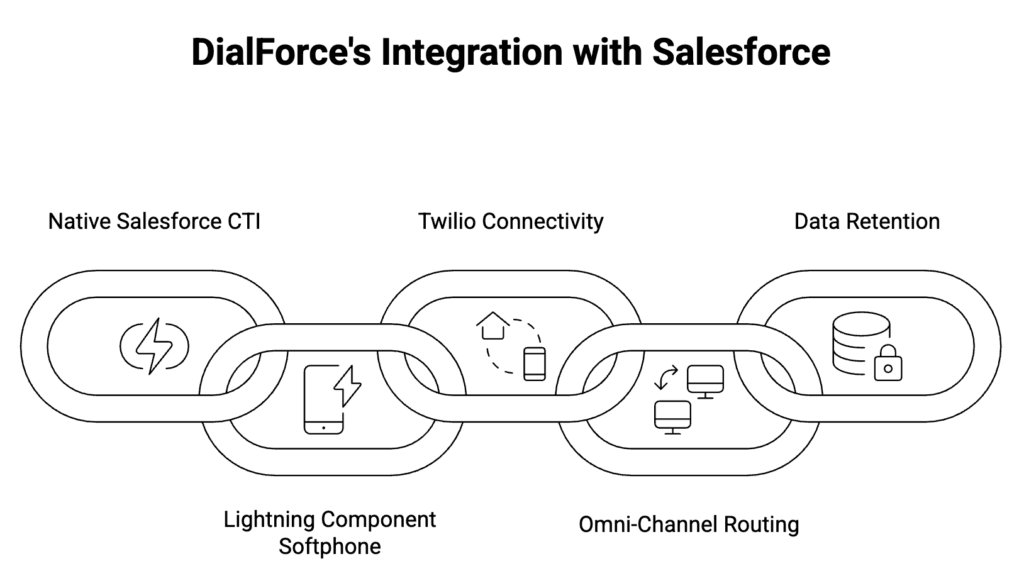
- It is a 100% native Salesforce CTI on Lightning.
- The softphone is a Lightning component using Open CTI and Salesforce Voice APIs, not an iframe or external UI.
- Twilio provides carrier-grade telephony and WhatsApp connectivity.
- Routing runs through Omni-Channel, not an external rules engine.
- All logs and recording references stay in your Salesforce org.
In other words, WhatsApp Voice becomes just another channel on your native Salesforce CTI, not a separate tool your agents have to juggle.
For a native implementation of this Salesforce WhatsApp Voice model, you can review DialForce on AppExchange here: AppExchange link
Treat this model as your reference design for Salesforce WhatsApp Voice. When you evaluate CTI tools, the question is simply whether they match this pattern. DialForce was built to align with it natively inside Salesforce.
If you want to review your current setup against this model, you can walk through it with the team here: https://dialforce.io/talk-to-sales/
Author: Nikhil – Senior Client Consultant
I spearhead marketing and Salesforce telephony integration initiatives for DialForce, a cutting-edge solution connecting Twilio with Salesforce. I craft high-impact blogs, guide users through onboarding and training, and drive adoption of advanced call management and automation across industries. Passionate about enhancing customer engagement through technology, I support businesses in improving their communication processes.