If you’ve been around more than one CTI rollout, you already know the pattern: the phones “work,” but reporting is unreliable, routing rules live in a vendor UI, and no one is quite sure where recordings and call data actually live.
When you strip away branding, most of those problems are not feature issues. They’re architectural. Specifically: is Salesforce the system of record for telephony, or just a place where a CTI connector drops some activity logs?
That is the real difference between native and non-native CTI.
1. How to spot a non-native Salesforce CTI
Often before definitions, it helps to look at the symptoms. These are the red flags I see when CTI lives “next to” Salesforce instead of in it:
- Routing rules live in another admin console Nobody in Salesforce can tell you why a call went to Agent A instead of Agent B without logging into the CTI vendor portal.
- Voice data doesn’t behave like the rest of your CRM Call outcomes, queues, and recordings don’t sit cleanly on the Voice Call, Case, or Opportunity records that leadership actually uses.
- Adoption requires tab-switching Agents live between a softphone in an iframe or browser extension and Salesforce tabs. Screen pops are inconsistent or delayed.
- Reports don’t match reality CTI dashboards and Salesforce dashboards disagree on something as basic as number of calls handled per agent.
- Security and compliance reviews stall Recordings are stored by the CTI vendor. Who can listen, how long they’re kept, and how access is audited is governed outside Salesforce security.
If two or three of those are true in your org, you are operating on a non-native CTI architecture, even if the product markets itself as “for Salesforce.”
2. Two very different CTI architectures
At a high level, there are only two real CTI models in Salesforce
2.1 Non-native (integrated) Salesforce CTI
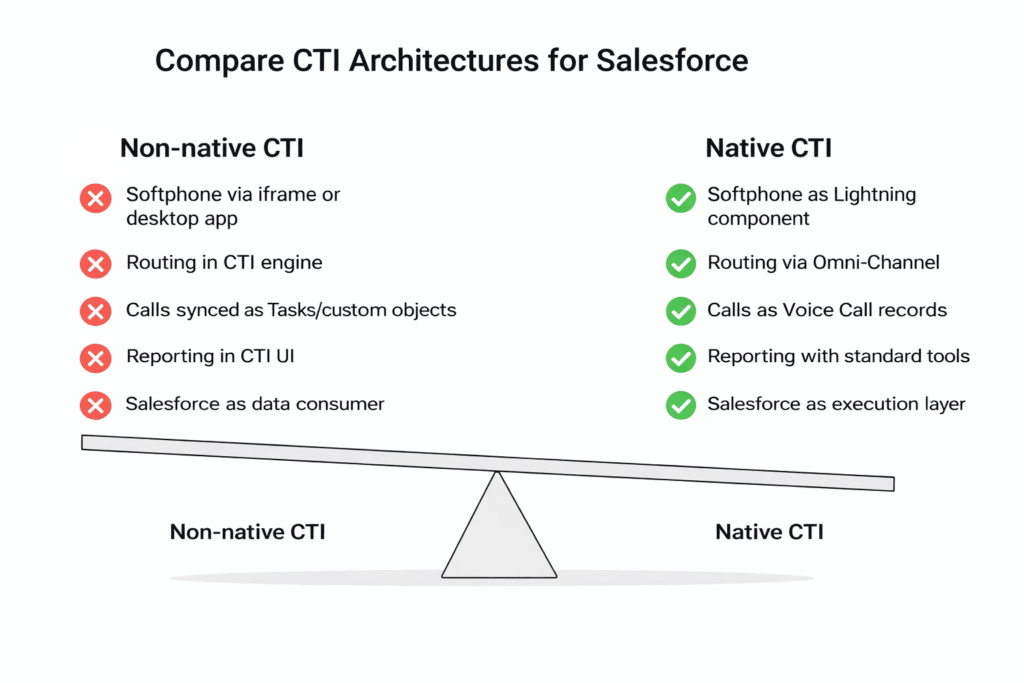
- In a typical non-native CTI setup, Softphone delivered via iframe, desktop app, or browser extension.
- Routing decisions made in the CTI platform’s own engine.
- Calls synced back into Salesforce as Tasks or custom objects after the event.
- Reporting and compliance live in the CTI UI, not Salesforce, so teams have to leave the CRM to answer basic questions.
Salesforce is a consumer of CTI data, not the place where telephony logic lives.
2.2 Native CTI inside Salesforce: one console, consistent UX
- By contrast, Native CTI matters because the softphone becomes just another Lightning component: agents stay in one console, the UI is consistent, and you avoid the iframe and plugin glitches that non-native CTI creates.
- Calls are represented as Voice Call records from the moment they start, so every interaction is trackable in real time, can drive Flows and Omni-Channel routing, and is available immediately for reporting, QA, and compliance instead of arriving later as a synced Task.
- Routing logic is split across two systems, so nobody has a single, reliable place to see or change how calls are routed.
- Automation, reporting, and access control handled with standard tools: Flow, Apex, reports, permission sets, FLS.
Here, Salesforce is the system of record and execution layer for voice, not just the reporting layer.
In this post we’ll compare the two architectures across five axes that Admins, Architects, and Managers actually care about:
- Softphone delivery
- Routing control
- Data model and call records
- Reporting and analytics
- Compliance and operational ownership.
3. Five ways native vs non-native CTI behave differently in Salesforce
3.1 Data model and reporting
Non-native (integrated) CTI
- In a non-native CTI setup, the CTI platform defines its own call schema and only maps a subset of fields into Salesforce..
- Dispositions and outcomes are often stored in generic text fields.
- Voice data isn’t consistently tied to Case, Lead, Contact, or Opportunity in a way RevOps can safely build on.
Practically, this is why “number of calls” in non-native CTI reports often doesn’t line up with activity recorded in Salesforce.
Native CTI
- Calls are stored as Voice Call records with relationships to the right business objects.
- Outcome, duration, direction, queue, and even routing path can be surfaced as standard fields.
- Managers build dashboards directly on Salesforce data:
- Answer rate by queue
- Handle time by issue type
- Missed vs completed callbacks
Because call data from a native CTI lives directly in Salesforce, it behaves like the rest of your CRM data
3.2 Routing and capacity management
Non-native Salesforce CTI routing
- Queue membership, skills, and overflow rules are configured in a separate CTI admin portal.
- Any change to routing usually requires CTI admin access, sometimes vendor support.
- If you also use Omni-Channel for digital channels, you now have two routing brains: one for voice, one for everything else.
This split creates operational debt. Support managers and Admins have to mentally merge two routing models to understand overall capacity.
Native Salesforce CTI routing (Omni-Channel)
- Voice is just another work item type in Omni-Channel:
- Same queues
- Same skills
- Same presence configuration
- Same business hours and holidays
- Capacity, overflow, and priority are controlled in one place.
When someone asks “How do we prioritise VIP voice calls vs regular cases during a surge?”, the answer lives entirely in Salesforce configuration.
3.3 Automation and workflows
Non-native Salesforce CTI automation
- CTI events are emitted from the vendor platform.
- Salesforce receives those events via webhooks or a managed package, then tries to react.
- Any misalignment between the CTI event model and your Salesforce data model requires custom integration logic.
Over time, this is where divergence appears: automation in Salesforce assumes one behaviour, CTI events deliver another.
Native Salesforce CTI automation with Flow
- Call lifecycle events are just record events.
- You can use Record-Triggered Flows on Voice Call and related objects to:
- Create callback tasks when a call ends with “Left Voicemail”.
- Escalate to a manager queue if a high-value account abandons in queue.
- Trigger post-call SMS/WhatsApp follow-ups (for example, via ValueText) based on outcome and segment.
No translation layer. The same automation tools you use for leads and cases apply to voice.
3.4 Security, recording, and compliance
Non-native Salesforce CTI security and recording
- Recordings are stored and managed by the CTI vendor.
- Recording access, redaction, and retention policies live in a separate security model.
- When legal or compliance teams review your controls, part of the answer is “we’ll export from the CTI system.”
This may be acceptable for small teams, but it becomes a problem in regulated environments or when you’re asked to prove consistent policy enforcement.
Native Salesforce CTI security and compliance in Salesforce
- Recording references are stored in Salesforce, typically on Voice Call and related records.
- Who can see or play recordings is controlled by:
- Permission sets
- Profiles
- Field-level security
- Sharing rules
- Retention behaviour can be implemented in Salesforce using scheduled jobs or Flow (for example, “delete or archive recordings after X days per region”).
Because everything is governed by the same security stack you already use, the story in risk and compliance conversations is cleaner.
3.5 Operations and troubleshooting
Native Salesforce CTI operations and troubleshooting in Salesforce
- Operationally, every extra CTI portal adds friction when something breaks (missing calls, strange routing behaviour), you end up:
- Looking at CTI logs in the vendor portal
- Checking API logs for Salesforce
- Trying to reconcile timelines between the two
The incident review is split across systems.
- Operations teams can diagnose from within Salesforce:
- Voice Call records show what was routed, to whom, and with what outcome.
- Omni-Channel shows agent presence and capacity history.
- Flows and routing rules are versioned and visible in Setup.
You still need carrier-level observability, but most day-to-day failures can be understood from the CRM side.
4. What “native CTI” really means in Salesforce terms
The term gets used loosely in the market, so it’s worth being concrete. In a strict sense, a native CTI approach means:
- The softphone runs as a Lightning component using Open CTI, not as an embedded third-party UI that merely points to Salesforce.
- The primary call record is Voice Call, not a proprietary object with partial replication.
- Routing uses Omni-Channel and Salesforce configuration, not an external routing engine.
- Automation is Flow/Apex-driven on Salesforce objects, not middleware reacting to webhooks.
- Security, recordings, and analytics rely on Salesforce’s own data and permission model.
If any of those are missing, you are somewhere on the spectrum towards “integrated CTI,” even if the app is installed from AppExchange.
5. DialForce as a concrete native CTI implementation
In this context, DialForce sits deliberately on the native side of that line.
Architecturally, it is designed as:
- 100% Lightning native : The softphone is a Lightning component, not an iframe or external console.
- Built on Open CTI and the Salesforce Voice APIs.
- Using Twilio as the carrier backbone only; call data and control live in Salesforce.
- Logging calls as Voice Call records tied to Contact, Lead, Case, Account, and other relevant objects.
- Routing voice through Omni-Channel, alongside your existing case/chat workloads.
In practice, that gives your teams:
- Admin-owned routing, business hours, and skills in Salesforce.
- A unified timeline where voice and (if you use it) WhatsApp activity sit next to cases, tasks, and messages.
- Real-time dashboards that read directly from Voice Call and related objects.
- Compliance and security teams who can govern call access with familiar Salesforce controls, not a separate CTI security model.
DialForce is not positioned as “a dialer that integrates with Salesforce.” It is a CTI layer intentionally expressed in Salesforce primitives so that architecture, governance, and operations stay where your teams already work.
6. A practical next step
If you’re reviewing CTI options, or trying to untangle an existing implementation, start with a short architectural audit rather than a feature matrix:
- Where do routing rules actually live today?
- What is the true system of record for call history and recordings?
- Which changes can a Salesforce Admin make without touching a vendor portal?
- Can you answer audit and performance questions from Salesforce alone?
If you want to see how this native CTI architecture is implemented in a live product, you can review DialForce on the Salesforce AppExchange:
👉 DialForce AppExchange
The Dialforce team can walk you through a reference architecture in 15 minutes 👉 [Book a call]
Author: Nikhil – Senior Client Consultant
I spearhead marketing and Salesforce telephony integration initiatives for DialForce, a cutting-edge solution connecting Twilio with Salesforce. I craft high-impact blogs, guide users through onboarding and training, and drive adoption of advanced call management and automation across industries. Passionate about enhancing customer engagement through technology, I support businesses in improving their communication processes.